Tag: Query Builder

  • Data I Am: PR/FAQ

    Data I Am: PR/FAQ

    The “PR/FAQ” documents are fictitious press releases. See details:

    This document outlines the vision, problem, and solution
    behind the founding of Data I Am.

    It is intended to be publicly shared to explain what we’re
    building and why it matters.

    Inspired by Jeff Bezos’ practice at Amazon, this is the
    fictitious press release we wrote in June 2024—
    before writing a single line of code.

    The product became publicly available in February 2025.


    📣 Press Release

    Data I Am Launches AI-Powered Data Loader for Salesforce

    San Francisco, CA — February 24, 2025 — Today test marks the launch of Data I Am, an AI-powered data loader purpose-built for Salesforce. Designed for Salesforce Admins and data professionals alike, Data I Am brings AI intelligence to the data loading process—automatically detecting common issues, suggesting intelligent fixes, and ensuring clean data is loaded into Salesforce.

    Salesforce Admins have long been frustrated that data loaders are just that—loaders. They’re forced to manually fix broken or messy data, often in spreadsheets, before even attempting to import it. Data I Am reimagines this workflow by providing an intelligent, supportive interface that streamlines both data cleanup and loading.

    “We’re reimagining the data loading experience from the ground up,” said Zeb Mahmood, co-founder of Data I Am. “No more manual cleanup. Just upload your messy CSV—and let our AI fix and load it for you.”

    Zeb brings over nine years of product leadership experience at Salesforce and two decades of building data platform products. His deep understanding of enterprise applications and integration pain points inspired the creation of Data I Am.

    Customer feedback has already been enthusiastic.

    “I used to spend hours cleaning data in Excel just to get it ready for a Salesforce import. Now I just toss the CSV into Data I Am, and it does the fixing for me. What used to be a painful chore is now a quick, confident step,” said Jessica Lin, Salesforce Admin at AcmeTech.

    “Having clean, accurate data in Salesforce is a game-changer for our pipeline health and forecasting accuracy. Data I Am gives me confidence in the numbers we’re reporting upstream,” said Raj Mehta, CRO at Cresthill Systems. “Once the data is in Salesforce, it’s 100x more expensive to clean. Data I Am is our gatekeeper for good data!”

    This ability to save hours of manual cleanup work is where Data I Am delivers its biggest value. Admins can now focus on delivering business value instead of wrangling spreadsheets and VLOOKUPs.

    Try Data I Am for free at https://dataiam.com—no credit card required. You can sign in using your Salesforce credentials (SSO supported) and get started in minutes.


    Key Features

    Here’s what sets Data I Am apart from traditional data loaders:

    • Auto-detects target object and fields based on your CSV—even if headers are missing or incorrect
    • Fixes malformed CSVs, like addresses crammed into a single column
    • Suggests intelligent fixes for invalid picklist values, incorrect formats, and more
    • Fetches missing Record IDs using match fields—no need for Excel VLOOKUPs
    • Normalizes values based on field type (e.g., for Revenue field, $100M → 100000000.00)
    • Lets you preview fixes before loading into Salesforce
    • Supports SSO login with your Salesforce ID—no extra logins to manage
    • Free to use, with no credit card required

    FAQ

    What is Data I Am?

    Data I Am is an AI-powered data loader purpose-built for Salesforce. Unlike other data loaders, it helps users fix the data before loading—no engineering skills required.

    Who is it for?

    Data I Am is designed for Salesforce Admins and non-engineering users who regularly deal with data import/export tasks, as well as for data professionals who want to save time on cleanup. Our primary persona is “Alex Smith,” a Salesforce Admin who juggles multiple data tasks without writing code.

    Why are you building this?

    Because current tools are just loaders. But in reality, every CSV is messy in its own way, and the Admin is often left to clean up that mess before loading the data. We believe the loading experience should have fixing of data built-in; it should be intelligent, contextual, and supportive—just like a good assistant. And more importantly, it should save users hours of spreadsheet wrangling and guesswork every time they prepare a file.

    Fixing data before it enters Salesforce is not just more efficient—it’s essential. Once bad data is loaded, the cost to detect and fix it skyrockets. Broken flows, inaccurate dashboards, failed automations, and degraded user trust all stem from poor data hygiene. In the age of AI, accurate and timely data is everything—because AI is only as good as the data it learns from and operates on.

    What’s next?

    Salesforce is the first ecosystem; we’ll be building AI-powered data loaders for ServiceNow, NetSuite, Workday, and many more.


    To learn more or sign up: https://dataiam.com

    Zeb Mahmood

    Zeb Mahmood CoFounder & CEO Data I Am, Inc.

  • Case of Missing Record IDs

    Case of Missing Record IDs

    If you’ve ever been asked to mass update Salesforce records, you’ve likely run into The Record ID Problem.

    It goes like this:

    • A business team sends you a spreadsheet full of updated Salesforce data
    • You’re the Salesforce Admin or Analyst expected to upload it
    • But the spreadsheet? It doesn’t have Record IDs—and Salesforce Bulk API requires them for updates

    Why Spreadsheets Are Often Missing Record IDs

    People love working in Excel or Google Sheets. It’s fast, flexible, and familiar.

    Here’s a real-world example:

    A Marketing Manager downloads lead records from Salesforce, enriches them with firmographic data from a third-party source, and sends you the updated spreadsheet. Now they want you to push those updates back to Salesforce.

    But there’s a problem: the Record IDs are missing.

    To fix this, most Salesforce Admins have to:

    • Export the Lead object from Salesforce, including Record IDs
    • Manually insert the retrieved IDs into the original file i.e. use Excel’s VLOOKUP to match on a unique field like Email or Cell Phone

    This problem is so common that Salesforce Support even published a video tutorial: How to Prepare Your CSV File Using Vlookup in Excel

    How Data I Am Solves It

    Let’s say you get a spreadsheet from Marketing with updated Lead data—but no Record IDs.

    Here’s what happens in Data I Am, our AI-powered Fix & Load tool:

    1. Create an Update job and upload the spreadsheet 
    2. Data I Am’s AI auto-detects the target object e.g., Lead
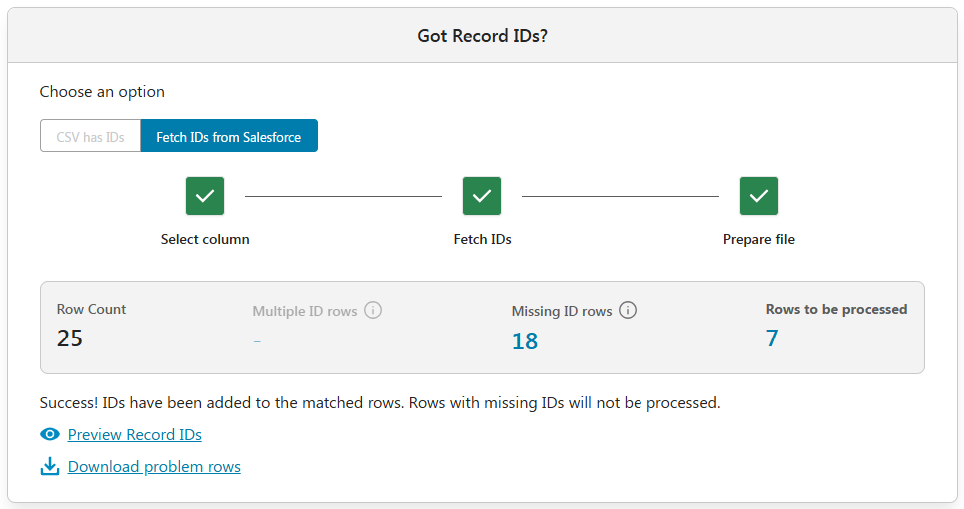
    3. Next, choose an option:
      • “CSV has IDs” , or
      • “Fetch IDs from Salesforce”
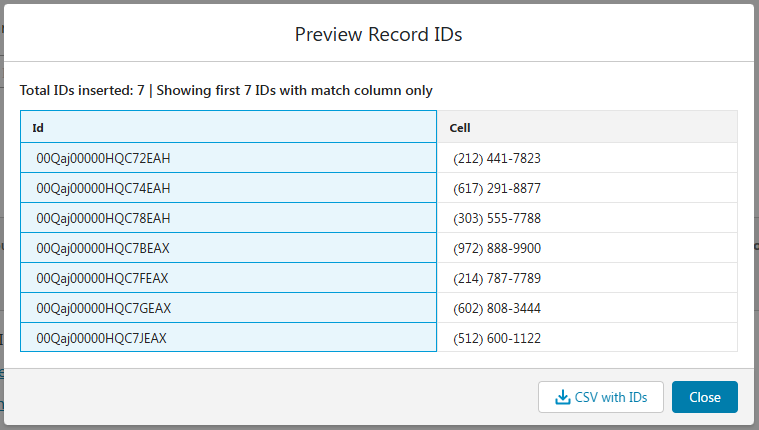
    4. If you choose to fetch IDs, simply select a match column (e.g., Cell Phone), and Data I Am will retrieve and insert the corresponding Record IDs directly into your file.

    During the match process, Data I Am flags:

    • Multiple ID rows – where the match column returns more than one record in Salesforce
    • Missing ID rows – where no matching record is found

    Then you simply run the job. Done. ✅

    Optionally, Data I Am lets you:

    • “Preview Record IDs” and download the enriched “CSV with IDs”.
    • “Download problem rows” file with multiple or missing IDs for further review.
    • On the “Data Fixes” screen, AI automatically identifies and corrects common issues. For example: If a column like Revenue contains non-numeric formats (e.g., "$100M" or "USD20,000"), they are normalized to standard numeric values (100000000.00 and 20000.00).

    Isn’t that magical! R.I.P., Excel VLOOKUP!


    TL;DR

    Salesforce Bulk API requires Record IDs to update records. But spreadsheets from business users often don’t include them. Data I Am fixes that—automagically.

    ✅ Fetches missing Record IDs
    ✅ Cleans messy spreadsheets before loading
    ✅ Handles edge cases e.g., rows that match multiple IDs


    Try It Free

    👉 dataiam.com
    📩 Or email our co-founder Zeb at TryNewThings@dataiam.com for a live walkthrough.


    About the Author

    Zeb Mahmood has spent his career unlocking business value by moving, fixing, and loading data—first as an engineer, then as a product leader, and now as a cofounder.

    With 2 decades in product management, 9 years at Salesforce, and hands-on experience in early-stage startups, he’s learned a simple truth: data is the lifeblood of every business. But when it’s messy or trapped in spreadsheets, it can’t drive impact.

    That’s why Zeb cofounded Data I Am — a Fix & Load AI built for Salesforce Admins and data handlers who just want their data to work. No frustration. No failed imports. Just clean, reliable data that loads seamlessly into Salesforce and delivers results.

    Zeb believes great products don’t win on tech alone — they win through empathy. Empathy for users, buyers, partners, and the people building the product every day.

    Zeb Mahmood

    Zeb Mahmood CoFounder & CEO Data I Am, Inc.

  • Now Querying: Related Objects

    Now Querying: Related Objects

    Let’s be honest—querying related objects in Salesforce isn’t exactly fun.

    If you’ve ever tried pulling a report of Opportunities along with Account names and the Owners’ aliases, you’ve probably ended up with multiple browser tabs open for SOQL dot notation help, a couple of manual VLOOKUPs, and maybe even a silent prayer.

    We’ve been there. So we made it better.

    We’re thrilled to announce a major upgrade to our Extract functionality (a.k.a. Salesforce Query Builder) in Data I Am:

    You can now query related objects in Salesforce—with just a few clicks!

    What Are Related Objects in Salesforce?

    Salesforce data is stored in a web of related objects—like linked database tables. A few examples:

    • A Contact belongs to an Account
    • An Opportunity is tied to both an Account and an Owner
    • A Case links to a Contact and an Account

    Also see: Object Relationships Overview by Salesforce


    How to Query Related Objects with Data I Am

    Until now, if you wanted to export data with related fields, you had to export one object at a time, merge them in Excel using VLOOKUP, and hope nothing breaks.

    But now you can: choose your base object, then select related fields across related objects—visually and with zero SOQL (yes, no guessing the dot-notation syntax).

    ✅ Select any standard or custom Salesforce object
    ✅ Browse related objects and pick the fields you want
    ✅ Preview your result set before full extraction

    It’s clean, intuitive, and designed for Salesforce admins, analysts, and consultants who just want the data—without the SOQL and spreadsheet drama.

    ⚠️ Like native SOQL and most third-party tools, you can go up the relationship chain — from child to parent (e.g., Opportunity → Account → Owner). However, you can’t yet go down (e.g., Account → all Contacts). We’re working on a way to support that for you — even though SOQL itself doesn’t natively allow it.

    Example: Query Related Salesforce Data

    Let’s say your manager asks for a list of open Opportunities that includes:

    • Opportunity Name
    • Account Name
    • Owner’s Alias

    In Data I Am, just:

    1. Select the Opportunity object and the Name field
    2. From Related Objects:
      • Choose Account → Name
      • Choose Owner → Alias
    3. See the auto-generated SOQL:
      SELECT Name, Account.Name, Owner.Alias FROM Opportunity
    4. Preview result set → Run job → Done!

    Also see the blog post: Visual Query Builder

    Modern Data I Am vs. Clunky Old Data Loaders

    With this latest enhancement, Data I Am is now more functionally capable than any leading data loader in the market. (Not bragging — just stating the facts.)

    Unlike traditional tools, Data I Am includes smart, AI-powered capabilities like:

    ✅ Flagging and fixing invalid picklist values
    ✅ Fetching missing Record IDs
    ✅ Correcting inconsistent data formats
    ✅ Previewing (and downloading) cleaned data before loading

    Want to see how Data I Am compares to Salesforce Data Loader (desktop) and MuleSoft dataloader.io? Check out our side-by-side feature comparison — a.k.a. the “truth table” — right here: https://dataiam.com/#data-loaders-side-by-side 


    ✅ TL;DR

    You can now query related objects in Salesforce using the Data I Am Query Builder—a visual, no-code way to quickly extract Salesforce data from related objects.

    No SOQL scribbling → SOQL with dot notation is generated for you

    No VLOOKUP dance → Select related fields visually

    No trial-and-error guessing → Preview the result set before exporting


    Try it FREE at: dataiam.com
    Or email our co-founder, Zeb, at TryNewThings@dataiam.com for a live walkthrough.


    About the Author

    Zeb Mahmood has spent his career unlocking business value by moving, fixing, and loading data—first as an engineer, then as a product leader, and now as a cofounder.

    With 2 decades in product management, 9 years at Salesforce, and hands-on experience in early-stage startups, he’s learned a simple truth: data is the lifeblood of every business. But when it’s messy or trapped in spreadsheets, it can’t drive impact.

    That’s why Zeb cofounded Data I Am — a Fix & Load AI built for Salesforce Admins and data handlers who just want their data to work. No frustration. No failed imports. Just clean, reliable data that loads seamlessly into Salesforce and delivers results.

    Zeb believes great products don’t win on tech alone — they win through empathy. Empathy for users, buyers, partners, and the people building the product every day.

    Zeb Mahmood

    Zeb Mahmood CoFounder & CEO Data I Am, Inc.

  • Visual Query Builder

    Visual Query Builder

    Salesforce users have long sought easier ways to build Salesforce Object Query Language (SOQL) queries. Feature requests like this IdeaExchange post highlight the demand for a query builder that’s more usable and intuitive.

    While Salesforce does offer tools like the Query Editor, they come with several limitations:

    • Limited or no support for browsing custom objects or fields
    • No visibility into field data types or relevant operators
    • Limited or no support for related objects
    • No generation of date literals for date/datetime fields

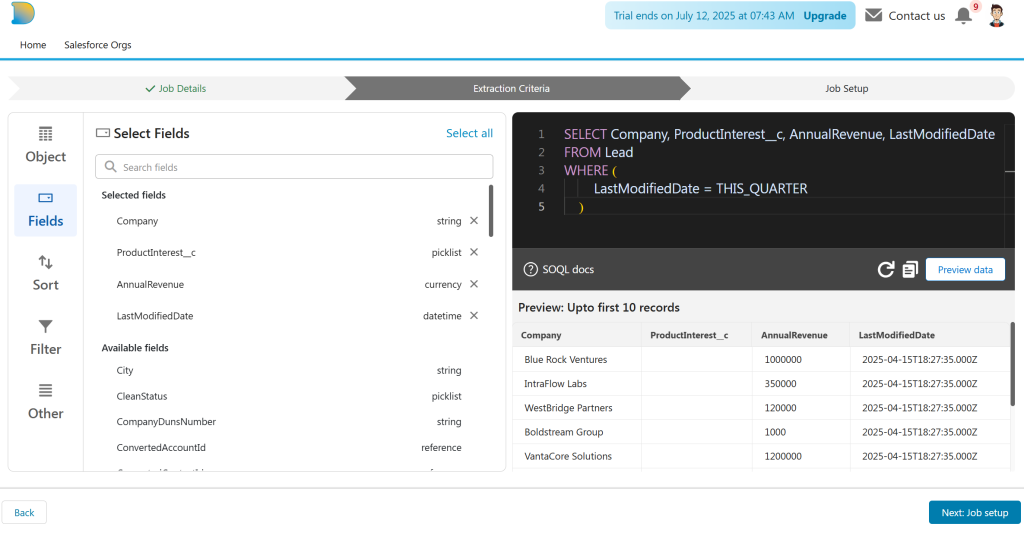
    Data I Am addresses these gaps with a no-code SOQL query builder, available at app.dataiam.com.

    Generate SOQL Queries with Confidence

    Data I Am offers a visual query builder designed for Salesforce admins and business users who want to build valid, reliable SOQL queries—without handwriting SOQL.

    Key capabilities:

    Browse standard and custom objects

    Explore objects and fields—both standard and custom—through a clean, point-and-click interface.

    Data type–aware filtering

    Only relevant operators are shown based on each field’s data type. For example:

    • =, <, > for numeric fields
    • CONTAINS, STARTS WITH, ENDS WITH for text fields

    Date literal support

    For date fields like LastModifiedDate, the builder presents Salesforce-supported date literals such as YESTERDAY, LAST WEEK, LAST QUARTER, and more—removing the need to look up syntax.

    Relationship navigation

    Easily access fields from related objects (e.g., pulling Contact fields while querying Account records).

    Syntax Validation

    Perform client-side SOQL syntax validation before submitting the query to Salesforce; avoid unnecessary API errors or quota waste.

    Data Preview

    Preview the result set before executing full query.

    Part of a Feature-Rich Data Loader

    The query builder is part of the broader Data I Am platform, which also includes:

    • Insert, update, upsert, and delete operations (lookup coming soon)
    • AI-powered field mapping between CSV columns and Salesforce fields
    • CSV file restructuring to enable 1-to-1 column-to-field mappings
    • Automated data fixes for invalid picklist values, missing Record IDs, and formatting errors

    Together, these capabilities allow non-engineers (e.g. Salesforce administrators) to handle complex data loads and extracts—filling important functionality gaps left by native Salesforce Data Loader and many third-party tools.

    Try It and Tell Us What You Think

    Data I Am is continuously evolving based on user feedback. Have suggestions or feature requests? Reach out at TryNewThings@dataiam.com.

    To try the query builder, sign up for free access →


    About the Author

    Zeb Mahmood has spent his career unlocking business value by moving, fixing, and loading data—first as an engineer, then as a product leader, and now as a cofounder.

    With 2 decades in product management, 9 years at Salesforce, and hands-on experience in early-stage startups, he’s learned a simple truth: data is the lifeblood of every business. But when it’s messy or trapped in spreadsheets, it can’t drive impact.

    That’s why Zeb cofounded Data I Am — a Fix & Load AI built for Salesforce Admins and data handlers who just want their data to work. No frustration. No failed imports. Just clean, reliable data that loads seamlessly into Salesforce and delivers results.

    Zeb believes great products don’t win on tech alone — they win through empathy. Empathy for users, buyers, partners, and the people building the product every day.

    Zeb Mahmood

    Zeb Mahmood CoFounder & CEO Data I Am, Inc.